
We built ONSITE with four rating companies who wanted an inspection app built for how the industry works. They gave us the detailed feedback that shaped the exact specifications HERS Raters need for efficient inspection processes. Together, along with over a dozen other rating companies, they have completed 10,000 inspections and captured more than a ¼ million photos using ONSITE. About half of those inspections occurred in the last ten weeks!
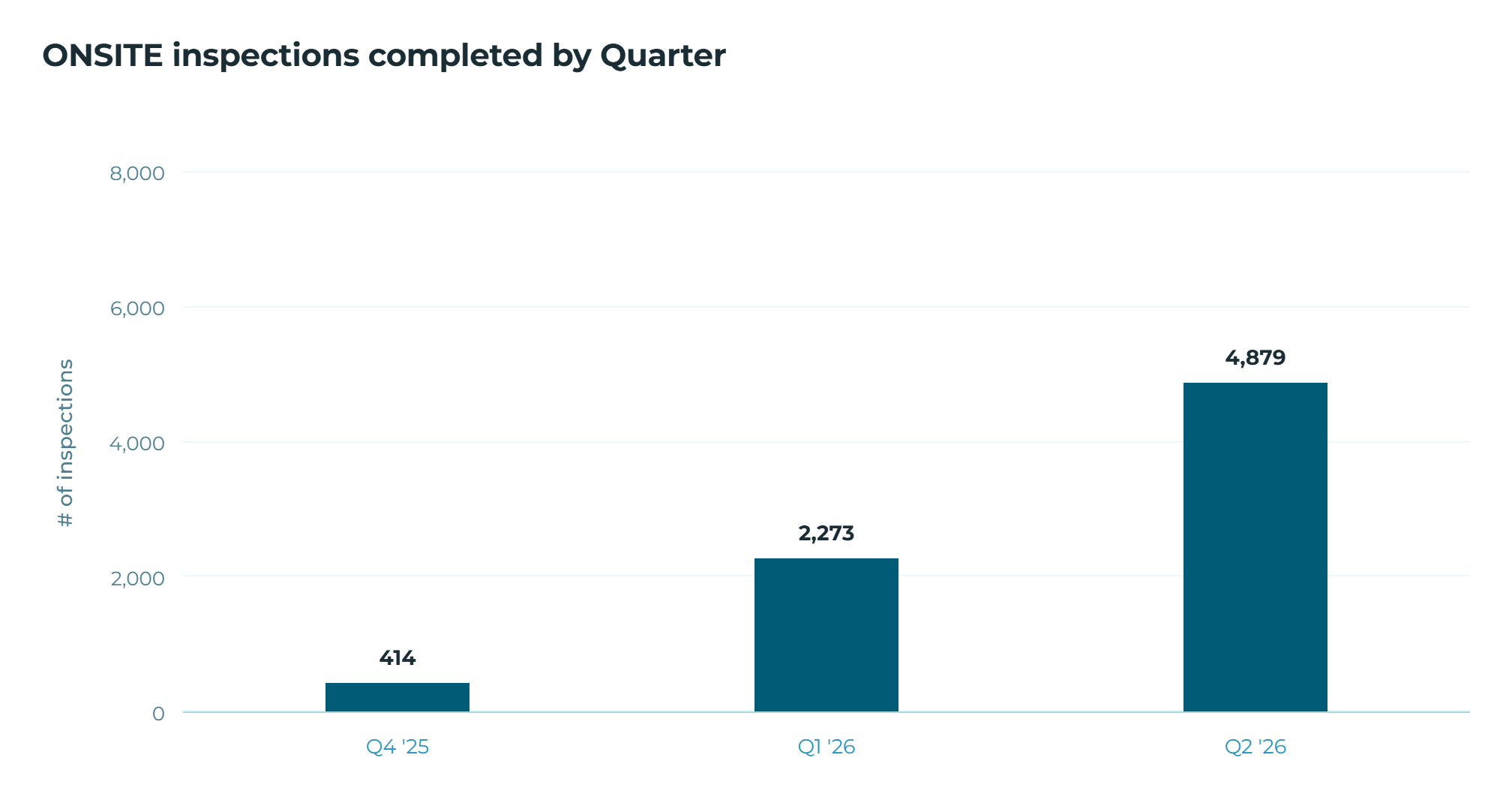
That growth taught us a lot about how rating companies run their inspections and where software helps most. It also showed us where AI could help in the field. This post covers both: what those 10,000 inspections taught us, and where we're pointing our AI work.
One thing up front: we build ONSITE with our customers. If you use it, we listen, and your feedback decides what we work on. ONSITE has continually improved since the beginning with new features added every week.
Photos matter more than ever
Photos carry more weight each year. RESNET now reviews them more closely in QA and is moving toward requiring photos in the building registry, so getting them right is no longer optional.
Photos also dictate the Raters process. For example, a photo of an HVAC nameplate is how a model number gets from the field to the office, where staff transcribe it, confirm the right AHRI certificate, and verify the rest of the file. This is only a smooth workflow if you can find the right photo at the right time. Photos pile up fast, and storage gets hard to manage. A photo that isn't labeled and filed where it belongs may as well not exist when someone needs it.
ONSITE handles that for you. Every photo is automatically labeled and tagged as it's taken. The label and tag are based on the minimum rated feature it documents, the inspection type, and more. Each photo saves to the corresponding energy model with one click of a button. You can filter down to the exact photos a review needs, and your QAD already has them. No uploading to a separate Dropbox, no chasing down a file someone forgot to share.
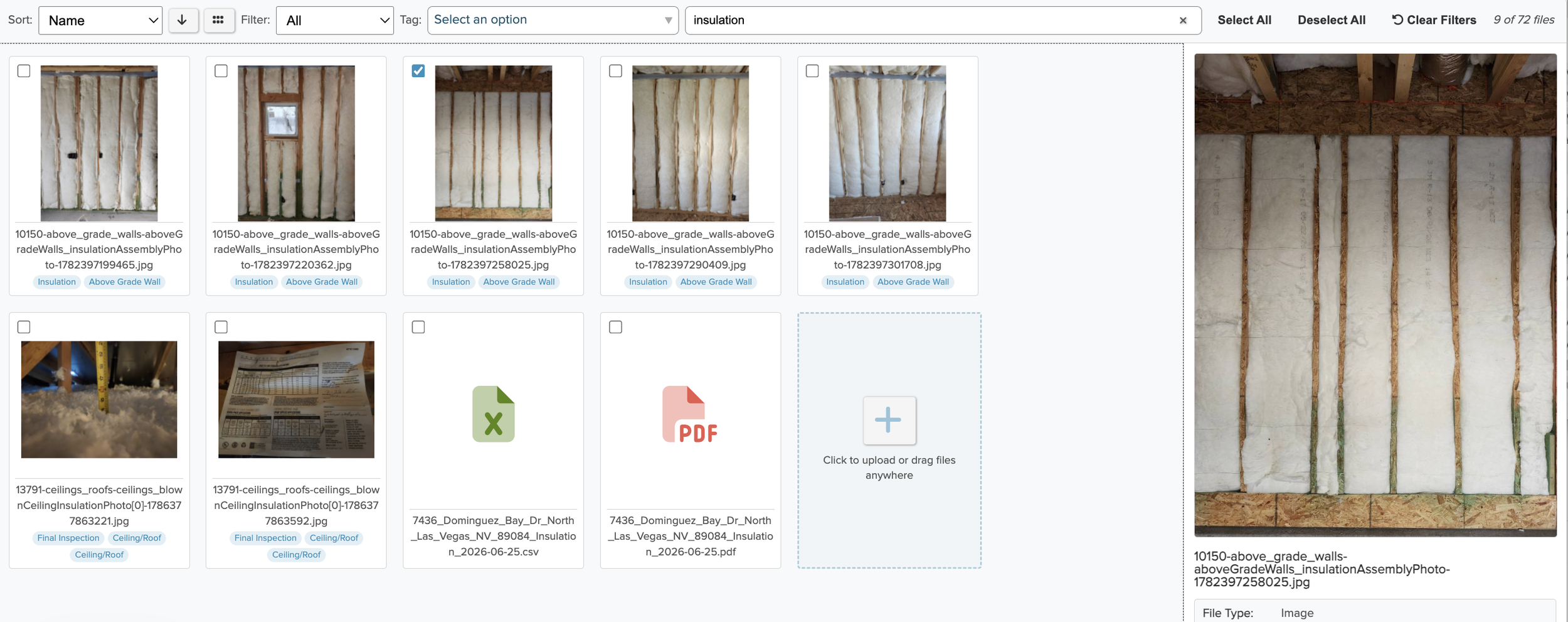
The Ekotrope File Library in action
Every rating company does the same job a little differently
Every rater captures the same minimum rated features. Almost everything around that varies.
Companies run different inspection types: HERS, energy code, ENERGY STAR, quality control, energy-code-only, blower-door-only. The day-to-day details differ too. Some photograph a detail and also write it down. Some capture at rough and final, others only at final.
ONSITE is built for that range. All ONSITE forms are customizable and include logic to show and hide fields based on inspection circumstances. Forms also include math to calculate results in real time, ability to add any question or input regardless of if it’s for a HERS rating or some other type of inspection. When starting with ONSITE, you get dozens of form templates to start from, and a form builder that lets you customize nearly every part of your inspection form to match how your team walks a house. You have the control to require certain data collection questions while others are optional, ensuring your field team knows what is important. The form builder controls what fields are synced to the energy model. ONSITE works for all types of inspections, not just HERS inspections. You also get the same support you already know from Ekotrope RATER.
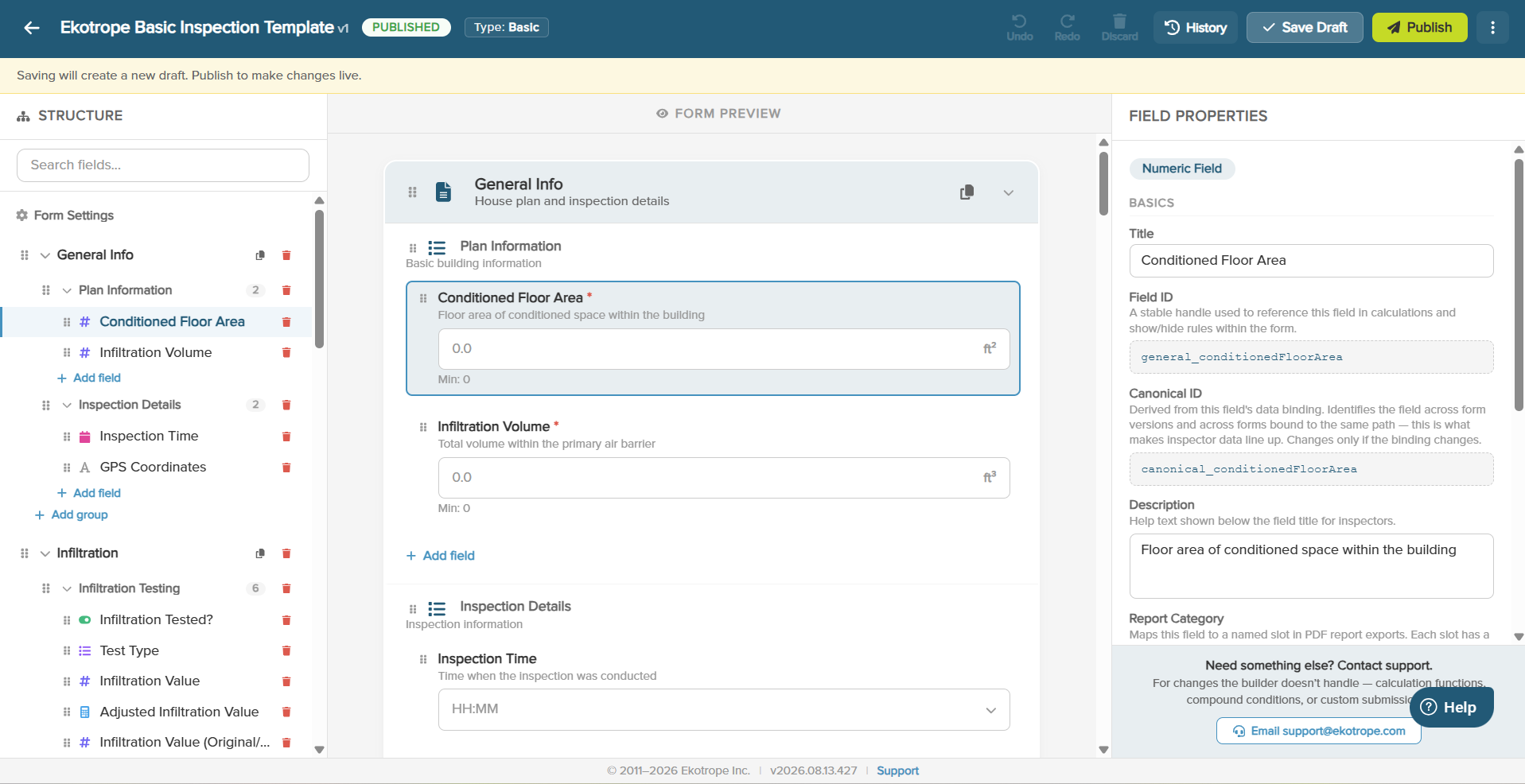
The ONSITE inspection form builder
Field staff and office staff want different things
The field team wants a fast inspection tool to inspect and collect field information, while the office staff wants a thorough database to keep track of projects, ensure all the required items are collected, and an easy way to update energy models after an inspection. This oftentimes is not met for either team and ends with time-consuming manual work uploading photos, copying model numbers, and other redundant tasks. The office and field teams have different wants, and very few rating companies have been able to meet both teams’ desires through a streamlined software solution. Inspectors and office staff are spending time on manual data entry tasks instead of working with builders to improve homes.
Here is how ONSITE addresses that balance:
It automatically updates results from the field, such as diagnostic test results and mechanical equipment model numbers, with change tracking in the Ekotrope energy model.
It shows the inspector data from the projected energy model, so diagnostic testing targets are right there, and they can check compliance on site.
It shows the next inspector what an earlier visit already captured, so nothing gets collected twice.
Its forms can be specified tightly, so each inspection asks for exactly what it needs. HVAC grading questions, for example, only appear on homes taking that path.
It supports photo-first inspections. An inspector who would rather shoot than type can build a form that is mostly photos, capture them in the field, and let the office review and finish the file. Every photo still sorts and saves to the right energy model on its own.
It automatically updates the Ekotrope energy model with labeled and tagged photos from the inspection.
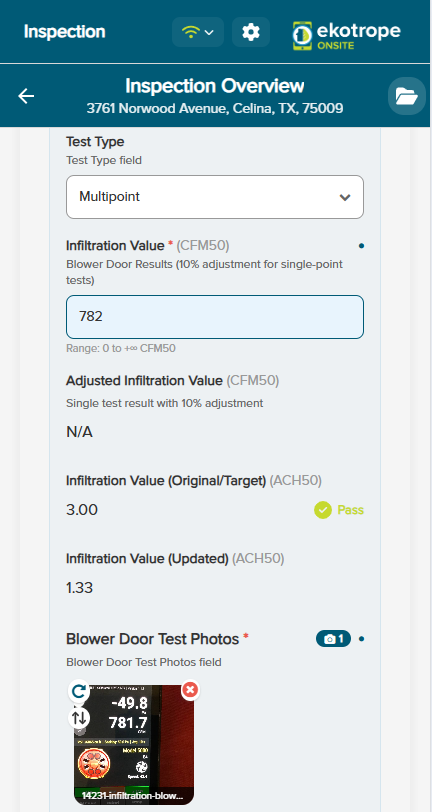
Inspectors get immediate feedback on diagnostic testing based on the projected energy model
Getting reports out to builders
Builders want to know what's happening on their homes, but getting them to act on a report is hard. They don't always read their email. What they care about is the signal buried in it: has the spec changed, is there a quality issue that turns into an expensive problem later, is there something they need to do.
We also learned that builder reporting needs are very challenging. Sending clear, useful reports takes time and effort, and most of it landed on the field inspector, whose job is throughput: how many inspections they can finish in a day. Reporting was the thing that slipped.
So we built reporting into ONSITE. With ONSITE, site visit reports are generated automatically at the end of each inspection. The reports are editable, so each one shares exactly what a builder needs to see. We also added custom subject lines to the emails that go out. An action-oriented subject line instead of a generic one improves open rates and makes clear, up front, what the builder needs to pay attention to.
We don't expect this to get every builder reading every report. But we are seeing builder QA teams increasingly ask for access to the inspection data, which tells us where this is going.
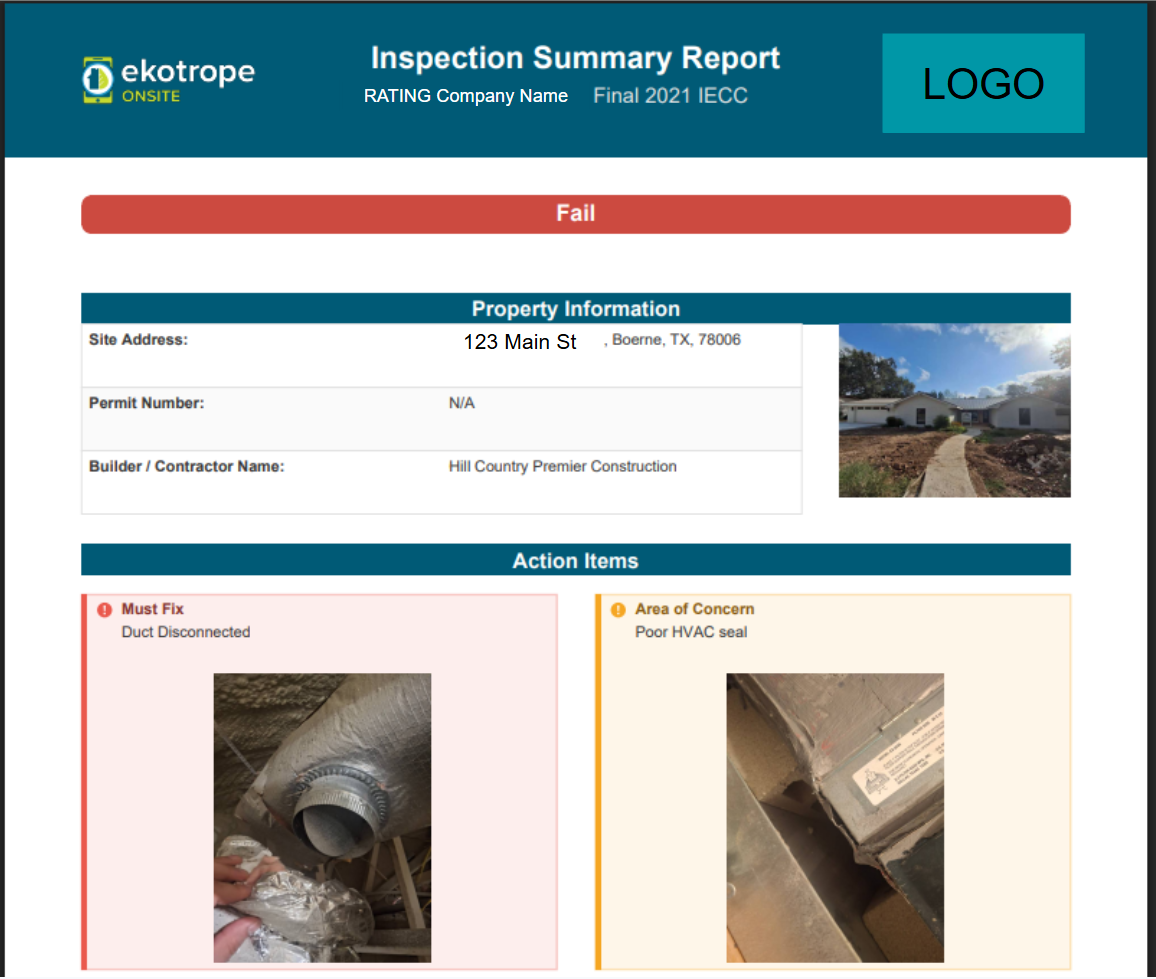
Inspection reports are automatically generated after inspections
Where this is pointing our AI work
Just as ONSITE has been developed so far, we are relying on Rater feedback to determine what AI features are important for you. We're building one piece now. The rest is up to user feedback.
We're working on pulling equipment model numbers straight from your photos and matching them to the right AHRI certificate. Snap the nameplate, and the model number and its certificate data come with it: accurate QA data and inputs from the first photo, and far less time on manual AHRI lookups back at the office.
Here are other ideas we're weighing. Tell us which would save you the most time:
Pull more from photos: insulation grade, insulation amount, and a check on window areas.
Turn an inspector's spoken notes into a written inspection report, reviewed and cleaned up against building-science knowledge.
Confirming a required photo actually shows what it should: the HVAC unit, not a thumb over the lens.
Flag a blurry or unreadable photo before the inspector leaves, so you never QA off a photo you can't read.
Use the photos already taken to answer some File QA and Field QA checklist questions for you.
Give field inspectors AI help in the app, backed by strong models and rater-specific knowledge, so they don't have to call the office or a senior inspector as often.
We aren't committing to build all of this, or to any timeline. Our best ideas so far came from raters telling us what matters to them. If one of these would make your work easier, we want to hear it.
Learn more about ONSITE today
If you already use ONSITE, keep the feedback coming. It's the reason the tool keeps getting better, and it's how these AI ideas will get sorted into an order that helps you.
If you don't use ONSITE yet and you want to see how your photos, forms, and QA could be streamlined in one software, reach out to info@ekotrope.com and we'll walk through your workflow with ONSITE in mind.
